Execution plans
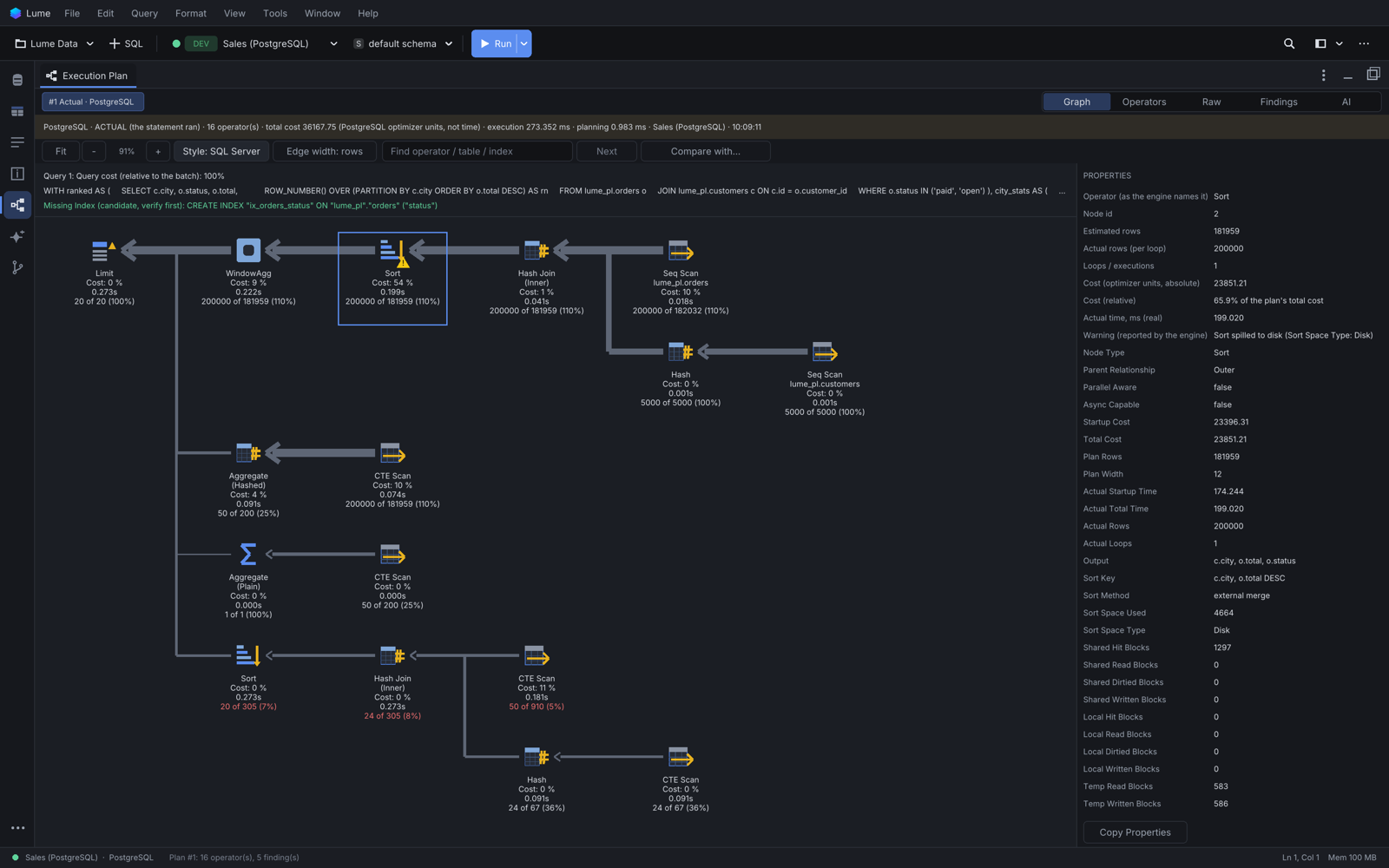
An execution plan shows how the database intends to run (or did run) a statement. Lume draws it as a graph in the Execution Plan panel, next to Results, for SQLite, PostgreSQL, MySQL, MariaDB, SQL Server and Oracle.
Capture a plan
| Command | Shortcut | What happens |
|---|---|---|
| Query > Explain > Explain Plan | Option+Cmd+E | the estimated plan. The statement never runs |
| Query > Explain > Explain Analyze... | the actual plan: the statement runs, so Lume asks first | |
| Query > Explain > Show Execution Plan | shows the panel with the plans captured so far |
They use the statement under the caret (or the selection) on the tab's connection, also from the toolbar and the command palette.
Actual plans and writes. The confirmation ("Run EXPLAIN ANALYZE?") reminds you that the statement runs completely on the server. On PostgreSQL, a statement that may change data runs inside a transaction that is rolled back afterwards (Analyze (rolled back)). A statement that writes is refused where nothing could roll it back (MySQL, MariaDB, Oracle, SQL Server), and always on PROD or read-only connections, before any question.
Reading the plan
The panel has five views:
- Graph: one node per operator, with an icon for its family (scan, seek, join, sort, aggregate...), the table and index, and
Cost: N %(the operator's own share). Actual plans add the time and "actual of estimated" rows, in red when far off. Arrows point to the consumer and get wider with the rows they carry; hover one for its rows and size. Hover a node for all its properties; a warning triangle marks what the engine flagged. - Operators: the same nodes as a sortable table.
- Raw: the plan exactly as the database returned it.
- Findings: what Lume noticed, each with its evidence: full scans on large inputs, row estimates far from reality, sorts or hashes that spilled to disk, stale statistics, and index candidates. A SQLite
SCANalone is never called "index needed". - AI: plan analysis by Lume Intelligence.
Navigation: drag to pan, scroll or pinch to zoom, Fit to frame the whole plan. Style switches the graph layout (the default, right-to-left with the root on the left; Compact: R to L; Compact: top down); Edge width switches between rows and flat. Find searches operators, tables and indexes. Right-click a node for Collapse Subtree, Focus Node, Copy Properties, and the AI actions.
Values a database does not report are left out, never shown as zero.
Several plans
- Each capture is a chip above the graph; Lume keeps the last 20 for the session. Double-click a chip to pin it.
- Compare with... puts two plans of the same statement side by side with their costs. Lume never claims two queries return the same rows from their plans alone.
- Export Report (Markdown) writes the plan, its findings and properties to a file.
Index candidates
A candidate cites the node and predicate that suggest it, with equality columns before range columns. Review index candidate... opens it as a draft in the Table Designer, where it goes through the usual review, PROD confirmation and apply. Nothing is created from the plan itself.
On PostgreSQL with the hypopg extension, Estimate with it (hypopg) re-plans the statement with the candidate as a hypothetical index and shows both plans with their costs. Nothing is created in the database.
Lume Intelligence
With Lume Intelligence set up, Analyze Plan with AI... (also Analyze Subtree with AI... and Explain this Operator (AI)... on a node) explains the plan and suggests rewrites or indexes.
- What is sent is shown first. By default literals are masked and table and column names replaced by aliases. The SQL, literals, real names and the raw plan are sent only if you tick them.
- The AI cannot run SQL or change the database. Its SQL opens as a copy in a new tab, labelled unverified.
- Compare plans (estimated) next to a proposed rewrite captures its estimated plan (never run) and compares the costs with the original.
- Checking that a rewrite returns the same rows (row count and checksum, computed locally) runs both queries read-only, and only after you approve it in the assistant. No row is sent to the model.
Not available yet
Exporting the graph as an image, a minimap, an entry in the editor's right-click menu, and navigating among several plans returned by one batch.