A five-minute tour
Shortcuts are written for macOS. On Windows and Linux, Cmd is Ctrl and Option is Alt.
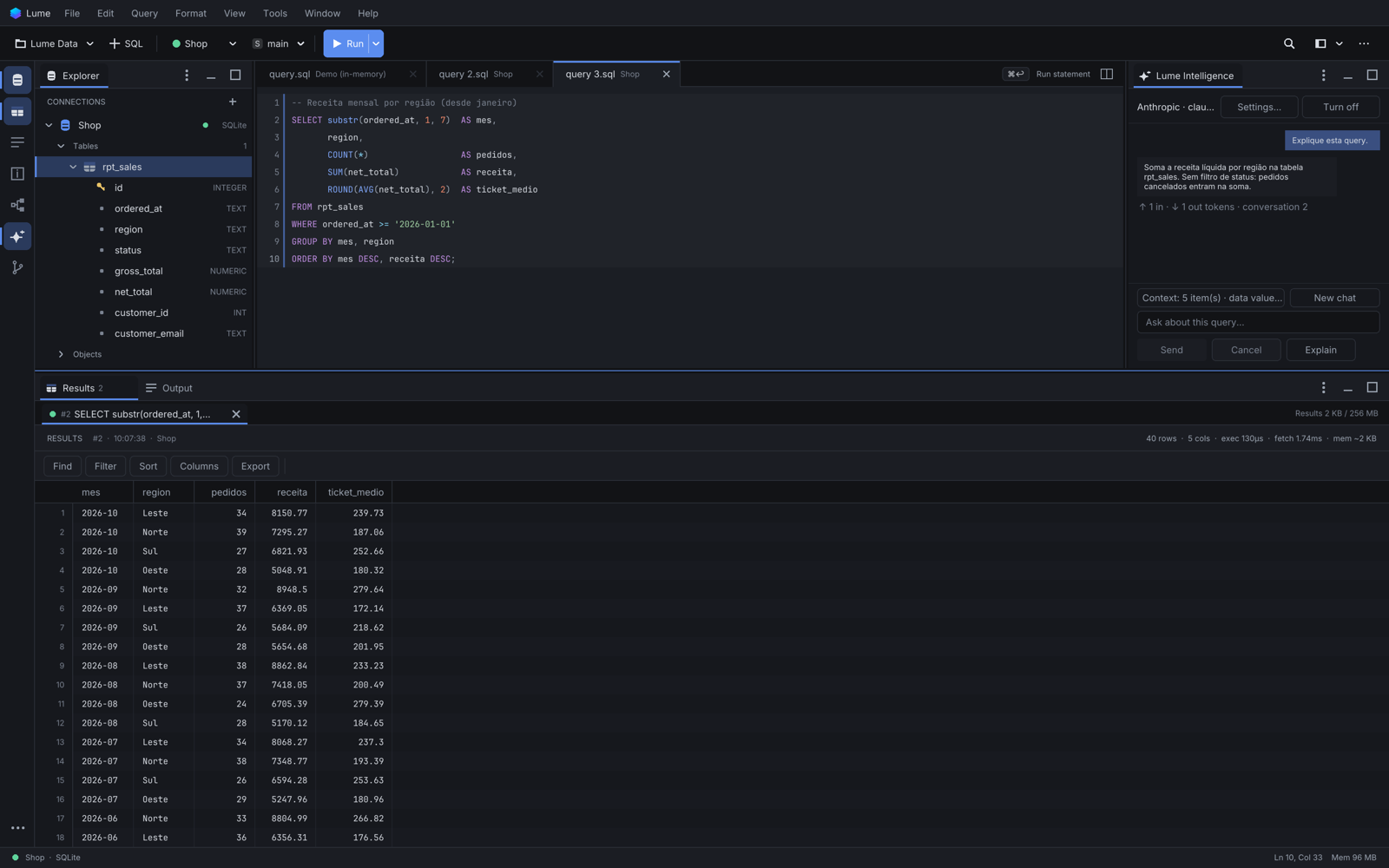
The window
- Explorer (left, Cmd+1): your connections and, under each, the database's schemas and objects.
- Query tabs (centre): each tab is bound to its own connection, shown on the toolbar.
- Results (bottom, Cmd+2) and Output (Cmd+3): the rows of the last run and what happened during it.
- Toolbar: workspace, new query, the tab's connection, schema and transaction mode, Run and Stop.
Try it
- Run SQL: type a statement and press Cmd+Return to run the statement under the caret. Shift+Cmd+Return runs the whole tab.
- Completion: after
JOIN orders o ON, Lume proposes the join conditions from the foreign keys, every column of a composite key included. - Results: click a column header to sort, right-click a cell for filters, copy formats and charts.
- Explorer: double-click a table to preview its rows; right-click it for Edit Data, Modify Table... and Show ER Diagram.
- Explain: Option+Cmd+E shows the execution plan of the statement under the caret, without running it.
- Command palette: Shift+Cmd+P finds any action by name, with its shortcut.
- Settings: Cmd+,.